First Person Basketball Guides
Controls, shooting, dunking, camera, and multiplayer — every tutorial in one hub.
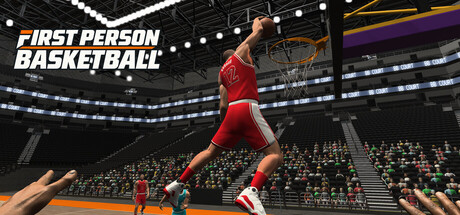
Welcome to the First Person Basketball guides hub. This Steam title from 纸上谈兵工作室 puts you on the court in a true first-person view for online games from 1v1 to 5v5, plus practice and AI modes. Released on November 4, 2026 for Windows, it is a lightweight competitive basketball game priced around $1.99 USD. Use this page as your map: every guide below is written for real Steam searches — how to move, shoot, dunk, tune the camera, and play online without inventing features the game does not have.
There are no redeem codes and this is not a Roblox experience. Everything here assumes the Steam client, keyboard and mouse, and the official store listing for app 5478590. Start with onboarding if you just bought the game, then drill mechanics before you queue ranked-feeling online matches.
Start here
- Getting Started — Buy and install on Steam, confirm Windows 11 64-bit and about 2 GB of storage, launch into practice or AI, and learn what to do in your first session. Covers Stable Camera as the post–November 5 default and how the first patch cleaned up practice hands, dunk framing, scoring replays, and multiplayer overhead.
- Controls — Full WASD + Space + mouse breakdown: movement, jump, crossovers, hop steps, fadeaways, steals, and blocks. Ideal bookmark while you rebind or teach a friend.
Skill guides
- How to Shoot — Release timing, fadeaways, hop steps into jumpers, contested looks, and first-person aim habits that transfer from practice to online.
- How to Dunk — Approach angles, Space timing, finishing through traffic, and how the November 5, 2026 patch improved dunk framing so finishes are easier to read.
- Camera Settings — Why Stable Camera is now the default, how Dynamic Camera still lives in Settings, and when each mode helps for shooting, dunks, and defense.
Defense, passing, and training ladder
- Defense, Steals & Blocks — First-person positioning, steal timing, Space contests, and help habits for 1v1 through 5v5.
- Passing & Team Play — Drive-and-kick reads, spacing, and when to pass instead of force a finish in 3v3–5v5.
- Practice & AI — Solo practice routines, AI as the bridge to lobbies, and when you are ready for online.
Play with others
- Multiplayer — Online 1v1 through 5v5, match flow, scoring awareness, and the November 5 improvements to online scoring replays plus reduced multiplayer overhead. Pair this with practice and AI warm-ups before long sessions.
How to use this hub
Read guides in order if you are brand new: getting started → controls → camera → shoot → dunk → practice & AI → defense → passing → multiplayer. If you already know the bindings, jump straight to shooting and dunking, then revisit camera when online contests feel jittery or hard to track. Every article uses locale-agnostic internal links (paths like /guides/controls/) so language prefixes stay consistent across the wiki.
Cross-check patch-sensitive advice against the Updates Hub when new Steam notes land. For broader site context, the Wiki overview and Tier List Hub sit alongside these tutorials. Keep sessions short at first: the game is inexpensive and light on disk, but first-person basketball rewards deliberate practice more than rushing into crowded 5v5 lobbies.
Practice loop that actually helps
- Open practice alone and walk the court with WASD until footwork feels automatic.
- Add Space jumps and simple finishes; confirm your hands render correctly after visiting the Controls menu (fixed in the November 5 patch).
- Switch camera modes once so you know Stable versus Dynamic before you care about aesthetics mid-match.
- Move to AI opponents for contested shots and steals without lobby pressure.
- Queue online multiplayer once you can hit open looks and finish dunks without freezing the camera.
What these guides will not promise
We stay inside verified game facts: Steam Windows release, WASD/Space/mouse kit, practice/AI/online modes, Stable Camera default after November 5, dunk framing and replay polish, and the published minimum requirements. We do not invent seasonal codes, Roblox scripts, console ports, or unverified creator videos. If a mechanic is not listed on the store page or in the known patch notes, treat it as unconfirmed until an official update says otherwise.
Bookmark this hub, then open the child pages as you need them. When friends ask how First Person Basketball works, send them Getting Started plus Controls first — those two pages answer most day-one questions before anyone worries about fadeaways or five-on-five spacing.
Frequently Asked Questions
Quick answers to the most common First Person Basketball questions.
Where should a new Steam player start?
Begin with the Getting Started guide for install and first-session flow, then read Controls and Camera Settings before deep diving into How to Shoot and How to Dunk.
Does First Person Basketball have redeem codes?
No. This wiki covers the Steam game only. There are no redeem codes or Roblox-style scripts to enter.
Which modes can I play before going online?
You can practice alone or face AI opponents, then move into online multiplayer from 1v1 up to 5v5 when you are ready.
What changed in the November 5, 2026 patch?
Stable Camera became the default, missing hands in practice after the Controls menu were fixed, dunk framing and online scoring replays improved, and multiplayer overhead was reduced. Dynamic Camera remains available in Settings.
What are the minimum PC requirements?
Windows 11 64-bit and about 2 GB of storage. Confirm details on the Steam store page for app 5478590 before purchase.