First Person Basketball Controls
WASD, Space, and mouse — movement, footwork, shooting, and defense.
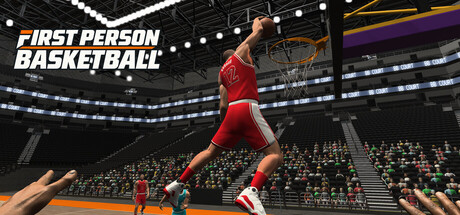
Every action in First Person Basketball on Steam starts from a compact scheme: WASD to move, Space to jump, and the mouse to look, aim, and drive skill inputs that cover crossovers, hop steps, fadeaways, steals, and blocks. This guide is the binding and feel reference for new players and returning players after the November 5, 2026 patch. Pair it with Getting Started if you have not installed yet, and with How to Shoot or How to Dunk when you are ready to turn inputs into points.
This is the Steam Windows build from 纸上谈兵工作室 (app 5478590). There are no Roblox scripts and no redeem-code shortcuts — skill comes from deliberate reps in practice, AI, and online 1v1–5v5.
Core input map
| Input | Role in First Person Basketball |
|---|---|
| W / A / S / D | Forward, strafe left, back, strafe right on the court |
| Mouse | Look, aim at the rim, and drive directional skill moves |
| Space | Jump for shots, dunks, contests, and vertical defense |
| Skill moves (mouse + movement) | Crossovers, hop steps, fadeaways |
| Defensive timing | Steals and blocks when you challenge the ball handler |
Exact on-screen prompt labels can vary by build, so open the in-game Controls menu once after every major patch. The November 5 update specifically fixed missing hands in practice after opening the Controls menu — if your arms vanish in practice, update Steam and re-enter the mode instead of reinstalling blindly.
Movement with WASD
First-person basketball movement is about facing, not just translating. Hold W to close space toward the rim, use A/D to create lateral separation, and tap S to create pull-up space or to reset a broken angle. Because you see through the player’s eyes, small strafes change your shot window faster than in third-person sports games.
Practice drills:
- Orbit the paint using only A/D while keeping the rim centered with the mouse.
- Sprint-style pushes with W into a controlled S slowdown before a jumper.
- Zigzag with A/D into a hop step gather so footwork and camera stay linked.
When movement feels automatic, add shooting and dunk approaches. If the view feels floaty, lock Stable Camera (the post–November 5 default) before blaming your hands — see Camera Settings.
Space: jump, finish, contest
Space is your vertical button. Use it to:
- Rise into jump shots and fadeaways.
- Leave the floor for dunks and finishes at the rim.
- Challenge shots for blocks when you have position.
Timing beats mashing. Jumping early on a dunk wastes the gather; jumping late on a jumper turns a clean look into a prayer. In practice, count a short cadence — plant, load, Space — until it matches your release. Dunk framing was improved on November 5, so finishes should read more clearly when you time Space correctly.
Mouse look and skill expression
The mouse does more than turn the camera. It frames the rim for shooting, sets the angle for drives, and participates in skill moves called out for this game: crossovers, hop steps, and fadeaways. Treat look sensitivity as a competitive setting:
- Too high: you overshoot the rim when rising into a jumper.
- Too low: you cannot snap to help-side steals or track a ball handler in 5v5.
Start slightly lower than your usual FPS sensitivity, then raise after a practice block. Revisit sensitivity whenever you switch between Stable and Dynamic camera modes, because perceived speed changes with camera behavior.
Crossovers
Crossovers create horizontal separation. Combine a directional WASD shift with the mouse-driven crossover input to move the defender’s feet. Use them on the perimeter before a pull-up, or as a setup into a straight-line drive. Do not spam — one decisive crossover into a planned shot is better than three decorative ones.
Hop steps
Hop steps gather momentum into a controlled plant. They shine when you need a clean base for a jumper or a gathered finish without traveling-feeling chaos. Practice hop step → Space → release on empty court, then against AI contests.
Fadeaways
Fadeaways buy space when a defender is tight. Lean create-space movement into a Space rise while keeping the rim in view. Fadeaways are harder in first person because the rim slides during the lean — Stable Camera helps many players keep the target readable. Full shot craft continues in How to Shoot.
Defense: steals and blocks
Steals punish loose handles and predictable gathers. Stay in front with WASD, keep the ball in view with the mouse, and time the steal when the opponent exposes the ball — not when you are trailing by two steps. Blocks need vertical timing with Space plus solid positioning; jumping from behind every play will get you dunked on or drawn out of the play.
Defensive checklist:
- Mirror with A/D instead of lunging W into every fake.
- Save Space for real elevation contests.
- After a miss or steal, turn with the mouse immediately — first-person recovery is about reorienting your view as much as your feet.
Controls menu hygiene after November 5
Open Controls to learn or rebind, then return to practice and confirm your hands render. The November 5 patch fixed the bug where practice hands could go missing after that menu. Also confirm you are on the build that improved dunk framing, online scoring replays, and multiplayer overhead — those changes sit beside the camera default swap to Stable.
Mode-specific control tips
Practice alone — Isolate one input family per block (movement only, then Space finishes, then fadeaways). Empty court feedback is honest.
AI opponents — Add steals and blocks under light pressure. AI is ideal for learning when not to jump.
Online 1v1–5v5 — Simplify. Prefer moves you can hit under stress. Read Multiplayer for session structure; do not invent complex combos mid-lobby.
Common control mistakes
- Looking with WASD instead of the mouse — Strafing cannot replace aim at the rim.
- Holding Space too long or mashing — Treat jump as a timed tap tied to gather.
- Changing camera and sensitivity at once — Change one variable per practice block.
- Skipping the Controls menu after patches — Prompts and fixes (like the hands bug) land here.
- Playing only online to “learn controls” — Practice and AI exist specifically for input mastery.
Practice plan focused on inputs (30 minutes)
- 5 min — WASD orbits with rim locked via mouse.
- 5 min — Space rise into open jumpers.
- 5 min — Crossover into hop step into shot.
- 5 min — Fadeaway reps from both wings.
- 5 min — Steal and block attempts versus AI.
- 5 min — Short online 1v1 applying only two moves you trust.
Log which inputs felt late. Tomorrow, only drill those. Link this page from your personal notes or share it with teammates so everyone uses the same vocabulary when you call “hop step pull-up” or “space for the block.”
Related reading
Return to the Guides Hub for the full map. After controls feel natural, prioritize shooting and dunking, then lock camera preference before long multiplayer sessions. Watch the Updates Hub when new Steam notes mention input or camera changes so this reference stays aligned with the live build.
Master the simple kit first. First Person Basketball does not bury you under forty bindings — it asks you to make WASD, Space, and mouse deadly through timing and court sense.
Frequently Asked Questions
Quick answers to the most common First Person Basketball questions.
What are the basic First Person Basketball controls?
Use WASD to move, Space to jump, and the mouse to look and perform skill actions. The game features crossovers, hop steps, fadeaways, steals, and blocks built around that scheme.
Should I open the Controls menu in practice?
Yes, to learn bindings — but update to the November 5, 2026 build or later. That patch fixed missing hands in practice after visiting the Controls menu.
Does camera mode change how controls feel?
Yes. Stable Camera (the default after November 5) keeps the view steadier for aiming; Dynamic Camera adds more motion. Retune mouse sensitivity if you switch modes.
Can I play with a controller?
This wiki documents the official WASD + Space + mouse scheme highlighted for the Steam release. Check in-game Settings on your build for any additional device support.
Where should I practice new inputs?
Use practice alone for isolated reps, AI opponents for contested timing, then online 1v1–5v5 once two or three moves feel reliable under pressure.