Getting Started with First Person Basketball
From Steam install to your first practice, AI, and online session.
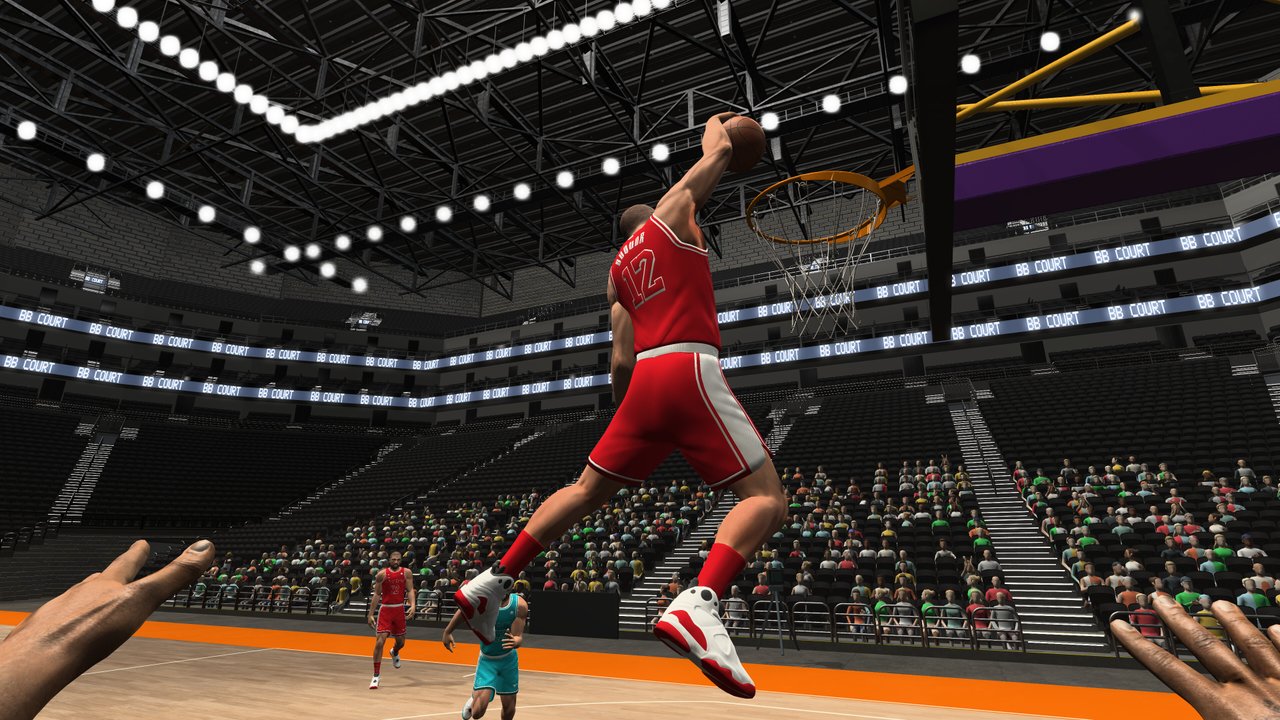
First Person Basketball is a Steam basketball game from 纸上谈兵工作室 that puts you on the floor in a first-person view. It launched on November 4, 2026 for Windows at roughly $1.99 USD, with an introductory −15% Steam offer running through November 18, 2026 (regional pricing varies). You can train alone, play against AI, or jump into online multiplayer from 1v1 to 5v5. This guide walks you from purchase to a confident first hour without filler and without inventing features the game does not ship.
There are no redeem codes and this is not Roblox. Everything below assumes the official Steam build (store page for app 5478590).
Before you buy
Confirm your PC meets the published minimums: Windows 11 64-bit and about 2 GB of free storage. The title is intentionally light, so older disks are fine as long as the OS requirement is met. Check that you have a keyboard and mouse ready — the core scheme is WASD + Space + mouse for movement, jumping, crossovers, hop steps, fadeaways, steals, and blocks. Full binding detail lives in the Controls guide.
Budget a short install window. At this size, downloads finish quickly on a typical Steam connection. After install, launch once from the Steam library to let first-run shaders or config settle before you invite friends.
Install and first launch checklist
- Open Steam and open the First Person Basketball store page (app 5478590).
- Purchase or redeem your Steam gift, then install to a drive with at least 2 GB free.
- Launch the game from your library.
- Open Settings and note the camera mode: after the November 5, 2026 patch, Stable Camera is the default. Dynamic Camera remains available if you prefer more motion.
- Open the Controls menu once so you know where rebinds live, then return to the court. The November 5 patch fixed missing hands in practice after visiting the Controls menu — if you played on day one, update before assuming a bug.
If anything looks wrong with your arms in practice, verify you are on the latest Steam build, then re-enter practice. That specific hand issue was addressed in the day-after-launch patch alongside dunk framing, online scoring replays, and multiplayer overhead reductions.
Choose your first mode
Practice alone
Start here. Practice lets you walk the floor, feel first-person depth, and try finishes without pressure. Use it to:
- Get comfortable with WASD strafing and turning with the mouse.
- Time Space jumps into layups and dunks (see How to Dunk).
- Practice open jumpers and fadeaways (see How to Shoot).
- Toggle between Stable and Dynamic camera so you know which you prefer before online play (Camera Settings).
Spend ten to fifteen minutes here. First-person basketball feels different from third-person sports games; the court edges and rim come up faster than many players expect.
AI opponents
When movement feels natural, add AI. AI sessions teach contests, steals, and blocks without lobby wait times. Focus on:
- Creating space with crossovers and hop steps before you shoot.
- Recognizing when a drive should become a pull-up instead of a forced dunk.
- Defensive timing for steals and blocks so you are not guessing online.
AI is the bridge between empty-court muscle memory and human chaos.
Online multiplayer (1v1–5v5)
Online is the long-term destination. Matches scale from one-on-one to five-on-five. Read the dedicated Multiplayer guide before long sessions. Key day-one tips:
- Warm up in practice or AI for a few minutes every time you boot.
- Prefer Stable Camera until you understand how Dynamic affects shot tracking.
- Expect clearer scoring replays and smoother sessions after the November 5 multiplayer polish — update if you installed on launch day only.
First-session goals (about 45–60 minutes)
Use this concrete checklist instead of wandering menus:
- Movement drill (10 min) — Circle the three-point line and paint with WASD only, then add mouse look. Stop when you can face the rim without over-rotating.
- Jump and finish drill (10 min) — Approach the basket from both wings using Space. Mix layup-speed gathers and dunk attempts. Note how dunk framing looks after the November 5 improvements.
- Shot timing drill (10 min) — Take open jumpers and a few fadeaways. Count a personal rhythm (gather → rise → release) instead of mashing.
- Defense drill (5–10 min) — Against AI, practice steals and blocks without gambling every possession.
- Short online set (15–20 min) — Play a 1v1 or small-sided game. Stop while focus is high; review what felt off and return to practice.
Camera and comfort early on
Motion comfort matters more in first-person sports than in many genres. If the view feels busy, stay on Stable Camera — it is the intentional default after November 5. Switch to Dynamic only after you can hit open shots on Stable. Details and tradeoffs are covered in Camera Settings. Lower mouse sensitivity slightly if looking up at the rim makes you overshoot aim; raise it later for faster defensive turns.
What to read next on this wiki
- Controls — Binding reference for every listed move.
- How to Shoot — Timing and contested shot habits.
- How to Dunk — Approach and finish craft.
- Camera Settings — Stable vs Dynamic deep dive.
- Multiplayer — Online formats and session tips.
- Guides Hub — Full tutorial map.
- Updates Hub — Patch tracker for future Steam notes.
Common early mistakes
Skipping practice. Jumping straight into 5v5 wastes time when you still misjudge rim distance.
Ignoring the day-two patch. Launch-day builds had known practice hand, dunk framing, replay, and overhead issues. Stay updated.
Fighting the camera mid-drive. Pick Stable or Dynamic before the match, not during a contested gather.
Expecting codes or Roblox scripts. This Steam title does not use those systems. Focus on mechanics and match sense instead.
Playing too long on day one. Short, deliberate sessions beat marathon queues while your eyes and hands adapt to first-person depth.
Hardware and settings sanity check
You do not need a high-end GPU for a title with a 2 GB footprint, but a stable framerate helps timing. Close heavy overlays if input feels delayed. Use a wired mouse if wireless polling feels inconsistent during fine aim near the rim. Keep Windows up to date enough that Steam and the game run cleanly on Windows 11 64-bit.
Mindset for a $1.99 competitive toy that plays serious
First Person Basketball is inexpensive, but online 1v1–5v5 still rewards deliberate practice. Treat the first hour as onboarding: install, Stable Camera, practice hands confirmed, a few AI games, then a short online set. Come back tomorrow and extend shooting and dunk drills. Link friends to this page plus Controls so everyone shares the same baseline.
When you finish this guide, you should know how to buy and install on Steam, which OS and storage rules apply, which modes exist, why Stable Camera matters after November 5, and which wiki pages unlock the next skills. From here, the court is yours — start empty, add AI, then go online.
Frequently Asked Questions
Quick answers to the most common First Person Basketball questions.
When did First Person Basketball release?
It released on November 4, 2026 on Windows via Steam (app 5478590), developed by 纸上谈兵工作室. An introductory −15% Steam offer runs through November 18, 2026 (regional pricing varies).
What should I play first: practice, AI, or online?
Start in practice alone to learn movement and finishes, add AI for contests and defense, then queue online 1v1–5v5 once timing feels consistent.
Why do my hands look wrong in practice after opening Controls?
A launch-window issue made hands missing in practice after the Controls menu. The November 5, 2026 patch fixed it — update through Steam and re-enter practice.
Is Stable Camera required?
Stable Camera is the default after the November 5, 2026 patch and is recommended for new players, but Dynamic Camera remains available in Settings if you prefer it.
Are there codes or Roblox scripts for this game?
No. First Person Basketball on Steam has no redeem codes and is not a Roblox title. Use the Steam store page for purchase and updates.