First Person Basketball Camera, Animation & Online Replay Update
What changed on November 5, 2026—and how to re-test your game feel.
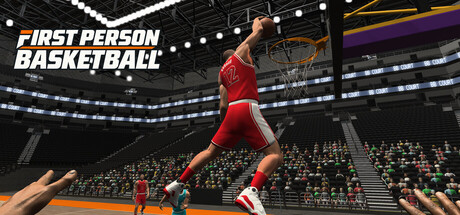
On November 5, 2026, First Person Basketball received a major Steam update titled along the lines of Camera, First-Person Animation and Online Replay Update. Coming one day after the November 4, 2026 full release, the patch targets readability in first person, practice reliability, scoring replays for non-hosts, and multiplayer processing cost. This page is an unofficial fan summary for players who want actionable takeaways. Always cross-check the official Steam news post for app 5478590.
If you need the broader patch timeline, return to the Updates Hub. For toggling Stable vs Dynamic and sensitivity habits, use the Settings Guide. Finishing drills live in How to Shoot and How to Dunk.
Why this patch matters
First Person Basketball sells a simple fantasy: you are on the floor with WASD, Space, and the mouse, finishing through traffic in practice, AI, or online 1v1–5v5. When hands vanish in practice, dunks are hard to read, or clients desync during score replays, that fantasy breaks. This update is less about new moves and more about trusting what you see and keeping lobbies smooth.
Stable Camera is now the default
New players start on Stable Camera. Dynamic Camera remains available in Settings. Existing camera preferences are preserved, so veterans are not forcibly swapped mid-season. Both options use the same gameplay rules—you are not choosing a different competitive ruleset, only a different presentation of the first-person view.
Practical advice
- Brand-new installs: try Stable for a full practice session before switching.
- If you loved Dynamic during the demo or launch day, re-enable it deliberately and compare dunk framing after this patch.
- After any future default change, glance at Settings before a ranked-feeling night with friends.
- Document which mode you used when reporting camera jolts (see known issues below).
Deep dive on feel and sensitivity: Settings Guide. Input basics: Controls.
Fixed missing hands during practice
A reported issue could make shooting arms disappear after you returned to practice from the Controls menu. The patch addresses that flow. Hands are critical feedback for release timing in a first-person basketball game; without them, jumper practice becomes guesswork.
Re-test checklist
- Enter practice.
- Open Controls / settings as you normally would.
- Return to practice and take ten jumpers and five layups.
- Confirm both arms and ball interaction remain visible through the gather and release.
If anything still vanishes, note the exact menu path and whether you were on Stable or Dynamic. Then keep drilling with How to Shoot once visibility is solid.
Improved first-person dunk framing
Camera positioning and transitions around dunks were adjusted so hand movement and rim contact are easier to see. The note applies to both Stable and Dynamic camera options. That matters for learning gather timing, adjusting approach angles, and deciding when a dunk is the wrong read versus a layup.
How to rebuild dunk confidence
- In practice, approach from a straight lane, then from a slight angle; watch the hand path into the rim.
- Compare the same line on Stable and Dynamic if you switch often.
- Take the improved feedback into AI before online traffic.
- Revisit finish rankings on the Tier List Hub—clear-lane dunks stay elite when you can actually see the contact.
Full approach guide: How to Dunk.
Improved online scoring replays
Automatic replay handling for non-host players was updated, along with transitions between replays, pause menus, and live gameplay. Score celebrations and review moments should interrupt less awkwardly for clients who are not hosting the session.
Lobby habits
- After a made basket, wait for the replay transition to settle before spamming pause.
- Hosts and clients should still expect occasional edge cases; report sticky transitions with party size and who was hosting.
- Do not assume a replay hitch means your shot timing changed—verify feel in practice offline if something feels “off” after a long online set.
Reduced multiplayer processing overhead
The patch removed some repeated foot-placement calculations while keeping full animations and collisions. Net goal: lighter multiplayer processing without turning players into ice-skating hitboxes. You should not notice missing footsteps so much as slightly smoother sessions when several athletes share the floor.
What to watch in 3v3–5v5
- Foot plant authenticity on cuts and closeouts.
- Collision fairness when two players meet at the ball.
- Frame time stability on modest PCs (remember the store baseline: Windows 11 64-bit, modest storage footprint).
Known issues still under investigation
The developer called out that occasional camera jolts and interruptions to online controls still need more work. Reports that describe what you were doing when the problem occurred are welcome. Useful details include:
- Mode: practice, AI, or online
- Camera: Stable or Dynamic
- Players in session and who hosted
- Whether everyone matched game version
- Action in progress: drive, gather, shoot, pause, replay, menu return
Version match reminder (critical for online)
Please make sure everyone is running the same game version before playing online. Mixed builds are a classic source of desync, missing fixes, or odd replay behavior. After Steam finishes an update toast, confirm every friend restarted into the new build before you start a serious set. The Settings Guide repeats this habit; the Links Hub explains how to verify news posts and update timing on Steam.
Suggested post-patch session plan
- Update and restart Steam client + game.
- Confirm camera mode in Settings (Stable default for new profiles).
- Practice: twenty jumpers, ten layups, ten dunks—watch hands and rim contact.
- Optional: flip Dynamic for five dunks, then return to your main mode.
- One AI game to test help-defense finishes.
- Online only after every teammate confirms the same version.
- Skim Tier List Hub if your dunk conversion feel changed.
How this wiki will follow up
When a future patch closes camera jolts or online control interruptions, we will add a new child page under Updates and link it here. Until then, treat this article as the canonical unofficial breakdown of the November 5 package.
First Person Basketball is still a young Steam release. Small presentation fixes like these often matter more than a flashy new animation pack—because they decide whether you trust the shot you just took. Put in the practice reps, keep versions matched, and use Stable or Dynamic deliberately rather than by accident.
Frequently Asked Questions
Quick answers to the most common First Person Basketball questions.
Is Stable Camera mandatory after the Nov 5 update?
No. It is the default for new players. Dynamic Camera stays in Settings, existing preferences are kept, and both modes share the same gameplay rules.
What practice bug was fixed?
Shooting arms could disappear after returning to practice from the Controls menu. Re-test that menu path after updating.
Did dunk gameplay rules change?
The notes emphasize camera positioning and transitions for clearer hand and rim contact in both camera modes, not a separate dunk ruleset.
Why do online friends still desync after updating?
Mixed game versions are a common cause. Have every player update and restart, then confirm the same build before creating or joining a room.
What issues are still being investigated?
Occasional camera jolts and interruptions to online controls. Send reports that describe the action, mode, camera type, and party setup when the issue hit.